# Connect a Wix site
Installing Next Horizon on a Wix site, linking it to your account from the Wix dashboard, what syncs, and the switches that send tracking and stock back to Wix
Section: app. Audience: public. Updated: 2026-10-12.
---
A Wix site connects through the Next Horizon app on Wix. There is no key to paste: Wix itself vouches for the site, and you confirm the link while signed in to Next Horizon, with your Next Horizon password. The Wix card sits in **"Stores"**, in **"Settings"**, beside the other platforms. See [Connect a store](/app/connect-a-store).
The site must run Wix Stores. Both Wix catalog versions are supported, and the card shows which one a site uses: **"Catalog V1"** or **"Catalog V3"**.
## Who can connect
Only the account owner and administrators can link, change or disconnect a Wix site. A Viewer sees the card, the sites and their sync times, with every switch and button disabled, and the dialog says **"You have view access. An account owner or admin can change these settings."**
On the Wix side, only the owner of the Wix site can link it. A collaborator who opens the app from Wix is refused.
## Step 1: install the app on your site
There are two ways in.
- From the Wix App Market: add Next Horizon to the site that runs your store and approve the permissions Wix lists.
- From Next Horizon: on the Wix card, **"Connect"** opens **"Connect Wix"**. **"Open the Wix installer"** opens Wix in a new tab, where you pick the site and approve. If your browser blocks the new tab, the dialog gives you the link instead.
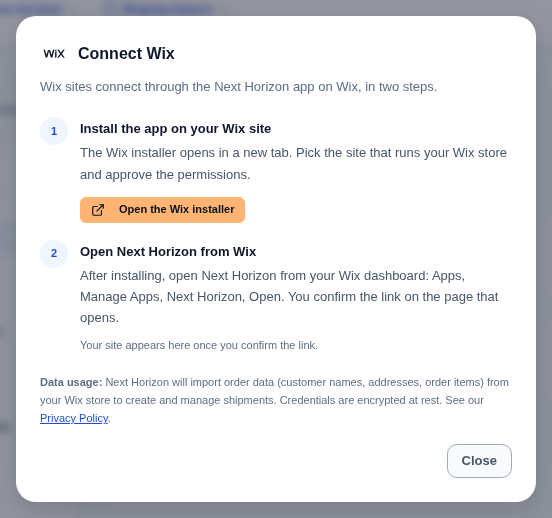
Installing alone links nothing. Wix tells us an app was installed, but that message is never treated as proof of who owns the site.
## Step 2: open Next Horizon from your Wix dashboard
In your Wix dashboard, go to Apps, then Manage Apps, find Next Horizon and choose Open. Wix opens Next Horizon at `/wix/open` with a signed value that proves which site you came from and that you own it.
If you are not signed in and the site is not linked yet, choose **"Sign in"** (or **"Create an account"**, when the page offers it), then come back to the same page to confirm the link.
If you are not signed in and the site is already linked, the page asks you to sign in to the account the site is linked to, and names that account (its name, or its email address partly hidden). Enter that account's Next Horizon password and choose **"Sign in"**: you go straight to **"Stores"**. If the account uses an authenticator app, its code is asked next. Opening the app from Wix never signs anyone in on its own: Wix tells us which site you came from, but only your Next Horizon password opens your account. If the account is not yours, choose **"Use another account"**. Each link from Wix can be used for one sign-in only; open Next Horizon from the Wix dashboard again for a fresh one.
The signed value is short-lived. If you take too long, or open the page from an old link, the page says the link has expired: open Next Horizon from the Wix dashboard again.
## The confirm screen
Nothing is linked until you confirm. The page names the Wix site, its address and the Next Horizon account it will join, and asks for your Next Horizon password. If you use an authenticator app, the page then asks for its code too. If you are a team member, you enter your own password, and the account named is the account owner's: the site joins the account, not you personally.
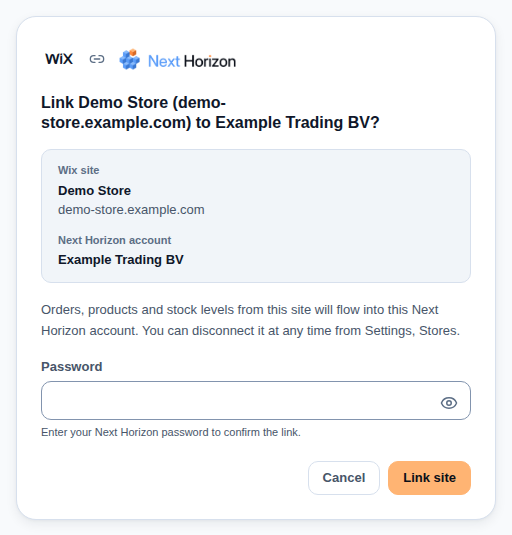
If you signed up with Google or Microsoft and never set a Next Horizon password, the page says so: set one with **"Forgot password?"** on the sign-in page, then open Next Horizon from your Wix dashboard again.
- **"Link site"** checks your password and links it. The page confirms the link and says the first import can take a few minutes. **"Go to your stores"** takes you to **"Stores"**.
- **"Cancel"** leaves your Wix site and your account unchanged. You can close the tab.
Linking does not change your plan. A linked Wix site counts as one connected storefront, like any other store, so it is refused once your plan's storefront limit is reached. See [Usage and limits](/app/usage-and-limits).
Opened from Wix, an account whose plan does not include Next Horizon sees **"This feature isn't included in your plan."** instead of a payment page: Wix allows purchases only through Wix.
## When linking is refused
The page says why, and what to do.
| What you see | What it means | What to do |
|---|---|---|
| Wix could not confirm this link | The signed value from Wix was missing, altered or did not check out with Wix | Open Next Horizon from the Wix dashboard again |
| This link has expired | The page was opened from an old link | Open Next Horizon from the Wix dashboard again |
| Only the owner of the Wix site can link it | You opened the app as a collaborator on the site | Ask the site owner to open Next Horizon from the Wix dashboard |
| Already linked to another Next Horizon account | One Wix site joins one account | Disconnect it in the other account first, or sign in with that account |
| This Wix site has no Wix Stores app | The site has no store to sync | Add Wix Stores to the site, then open Next Horizon again |
| Only an account owner or admin can link a Wix site | You are a Viewer on this account | Ask an owner or admin to open Next Horizon from the Wix dashboard |
| The Wix connection is not available yet | The integration is not switched on in this environment | Contact support |
| Incorrect password | The password is not the one of the Next Horizon account you are signed in to | Type it again, or use **"Forgot password?"** on the sign-in page |
| Your account has no Next Horizon password yet | You signed up with Google or Microsoft | Set a password with **"Forgot password?"** on the sign-in page, then open Next Horizon from the Wix dashboard again |
| Your plan's storefront limit has been reached | The account already uses every storefront its plan allows | Disconnect a storefront you no longer use (Settings, Stores), then open Next Horizon from Wix again |
## What syncs
Once linked, Next Horizon reads the site on a schedule. Wix also tells us when something changes, which only makes the next read happen sooner: the scheduled read is what keeps the data right, so nothing is lost if a Wix notification goes missing.
- **Orders**, with their customers, Wix fulfilments and refunds. New and changed orders arrive within about five minutes. Wix orders are not in the import menu on the Orders page: they arrive on their own.
- **Products and variants**, on both catalog versions. Each variant becomes its own product in Next Horizon, ready for passports.
- **Stock levels**, per variant. On Catalog V3 each Wix inventory location becomes its own location in Next Horizon. On Catalog V1 the site has one location.
Stock moves with the order: an approved order reserves it, a Wix fulfilment ships it, a cancelled order releases it, and a refund that restocks puts it back. A digital product passport is minted when an order ships, if passports are switched on for your account. Orders keep the currency they were placed in.
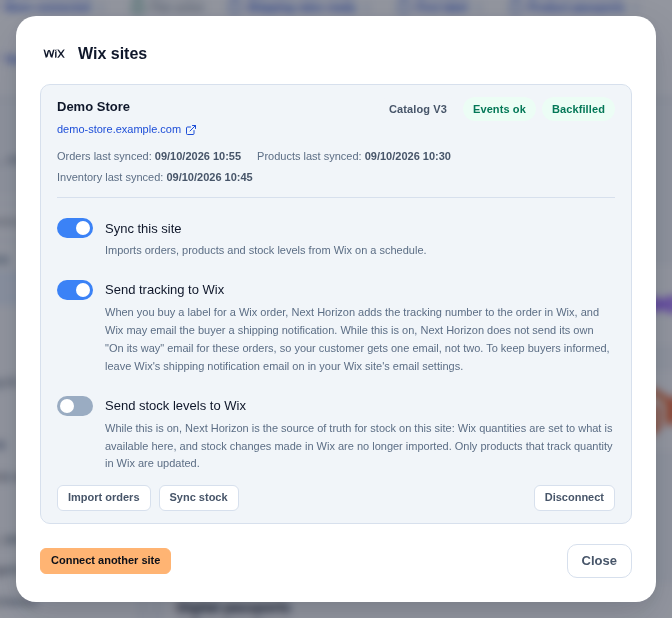
Each site row shows when orders, products and inventory were last read, under **"Orders last synced:"**, **"Products last synced:"** and **"Inventory last synced:"**.
### Your order history
When you link a site, its whole order history is imported, so past orders, customers, fulfilments and refund totals are all there. Orders and events dated before the moment you linked the site are history: they move no stock and mint no passports. Only what happens after the link reserves, ships or returns stock.
Orders, products and stock sync on their own every few minutes. To sync a linked site at once, use
**Import orders** or **Sync stock** on its row; the import runs in the background and you see a
notice that it is queued. A Viewer sees the buttons but cannot use them.
## The switches
Each site has three switches. The two that write to Wix are off until you turn them on.
### "Sync this site"
On by default. It imports orders, products and stock levels from Wix on a schedule. Turn it off to pause the site: nothing is read, and nothing is written to Wix either, even with the other two switches on.
### "Send tracking to Wix"
When you buy a label for a Wix order, Next Horizon adds a fulfilment with the tracking number to the order in Wix. One label writes one Wix fulfilment. For a label with several parcels, Wix holds one tracking number per fulfilment, so the label's main tracking number is the one written.
Wix may email the buyer a shipping notification when the fulfilment is added, depending on the site's email settings. Next Horizon cannot stop that email, so while this switch is on, our own **"On its way"** email stands down for those parcels: your customer gets one email, not two. So leave Wix's shipping notification email on in your Wix site's email settings: if you turn it off, the buyer gets no shipping email for those parcels. See [Notifications](/app/notifications).
Wix only accepts a fulfilment for an approved order, so a label for an order that is not approved in Wix is not written.
With two or more linked Wix sites, Next Horizon first asks each site for the order and writes the tracking to the site it came from. Turn "Send tracking to Wix" on for every site you want written. If no site can be found for an order, nothing is written to any site.
### "Send stock levels to Wix"
While this is on, Next Horizon is the source of truth for stock on this site. Wix quantities are set to what is available in Next Horizon, which is stock on hand minus what open orders have reserved, and never below zero. Stock changes made in Wix are no longer imported. Stock is sent on a schedule, and **"Stock last pushed:"** shows when it last went out.
Only products that already track quantity in Wix are updated. Next Horizon never switches quantity tracking on for a product.
Turn it off and Wix becomes the stock signal again: the next read imports Wix's quantities as they stand.
## Badges and what they ask of you
| Badge | Meaning |
|---|---|
| **"Needs reconnect"** | Next Horizon cannot reach the site. Open Next Horizon from your Wix dashboard to reconnect it |
| **"App removed on Wix"** | The app was uninstalled on Wix. Reinstall it, then open Next Horizon from your Wix dashboard to resume |
| **"Copy to confirm"** | The site is a copy of a linked site. It keeps the original's switch settings, and nothing syncs until the site owner opens Next Horizon from the copy's Wix dashboard and confirms |
| **"Wix Stores missing"** | Add Wix Stores to the site so its orders and products can sync |
| **"Disconnected"** | The site was disconnected in Next Horizon |
| **"Events ok"**, **"Events stale"** | Whether Wix's change notifications are arriving. Stale means they stopped while the scheduled reads still saw changes. Data still syncs on schedule |
A site that needs you also shows **"Needs attention"** on the card.
## Disconnecting
**"Disconnect"** on the site row, then **"Really disconnect?"**, stops the sync. You may be asked for the code from your authenticator app first. Disconnecting frees the storefront slot. Orders and products already imported stay in your account.
Disconnecting in Next Horizon does not remove the app from your Wix site. To remove it, uninstall Next Horizon in your Wix dashboard, under Apps, then Manage Apps. If you uninstall on Wix first, the row shows **"App removed on Wix"** and the sync stops on its own.
To link a disconnected site again, open Next Horizon from its Wix dashboard and confirm.
## More than one site
One account can link several Wix sites. Use **"Connect another site"** in the dialog, or install the app on the next site and open it from that site's Wix dashboard. Each site has its own switches and counts as one storefront. Tracking is written to the site each order came from.
**Support:** write to support@horizonlogistics.eu.