# Connect Shopify
Connecting a Shopify store, linking it from the Shopify tab, what syncs, how a label marks the order fulfilled in Shopify, and keeping returns and refunds in step with Shopify
Section: app. Audience: public. Updated: 2026-10-10.
---
A Shopify store connects from **"Stores"**, in **"Settings"**, with **"Connect Shopify"**. Once connected, its orders, products and stock come into Horizon on their own, and a label you buy in Horizon marks the order fulfilled in Shopify. This page covers the connection itself. For Horizon running inside Shopify admin, see [Horizon inside Shopify admin](/app/shopify-embedded-app). For mapping the delivery option a shopper picked at checkout to a carrier service, see [Checkout methods](/app/checkout-methods). Shipping rates at your Shopify checkout are described in [Connect a store](/app/connect-a-store#shipping-rates-at-checkout).
## Two ways to connect
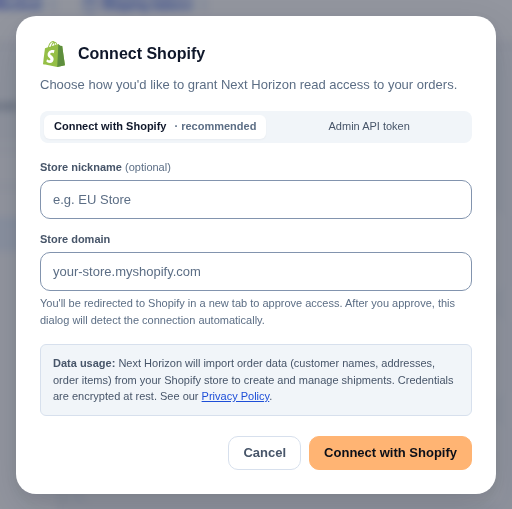
The dialog offers two tabs.
### "Connect with Shopify" (recommended)
1. Enter your **"Store domain"**, the `your-store.myshopify.com` address, and choose **"Connect with Shopify"**.
2. Shopify opens in a new tab. Approve the install there.
3. When the app opens in Shopify, choose **"Link to Next Horizon"**. A new tab opens on Next Horizon at `/shopify/link`. If you are not signed in, you sign in first and carry on from the same page.
4. The page says the store is linked to your account. Go back to the Shopify tab: Next Horizon carries on there by itself. **"Go to your stores"** takes you to **"Stores"**.
The connect dialog in your first tab updates on its own when the link is made. If it does not see the install, **"Refresh"** checks again and **"Try again"** opens a new Shopify tab.
The link from Shopify works once and only for a short time. If the page says the link has expired, was already used or is incomplete, go back to Shopify and choose **"Link to Next Horizon"** again.
The store links to the account that asked to connect it. If the page says this account did not ask to connect the store, sign in with the account you used for **"Connect with Shopify"**, or start the connection from **"Stores"** in the account you want.
### "Admin API token"
Use this when the guided route is not available to you. Create a custom app in your Shopify admin, give it at least read access to orders, and paste its **"Admin API access token"** with your store domain. The dialog has a step-by-step guide. Shopify shows the token only once, so copy it straight into the field.
Either way, you can give the store a nickname to tell several stores apart.
## What syncs
- **Orders**, as Shopify reports them: new paid orders, cancellations, fulfilments and refunds. A check every 15 minutes also picks up any order that changed in Shopify since the last one, so an order fulfilled or refunded in Shopify is fulfilled or refunded in Horizon too.
- **Products and variants**, as they are created, changed or deleted in Shopify.
- **Stock levels** per Shopify location, with the same 15-minute check behind the live updates. Stock flows from Shopify to Horizon.
To pull orders in now rather than wait, use **"Import"** on the Orders page. See [Orders](/app/orders#importing-from-your-stores).
## A label marks the order fulfilled in Shopify
When you buy a label in Horizon for a Shopify order, Horizon creates the fulfilment in Shopify with the tracking number and carrier. The order shows as fulfilled in your Shopify admin.
Horizon asks Shopify not to email your customer about that fulfilment. Their shipping emails come from Horizon instead, set up on **"Customer emails"**. See [Notifications](/app/notifications).
This needs Shopify's fulfilment permissions for Horizon. A store connected before Horizon asked for them keeps syncing orders, but is not marked fulfilled until you approve Horizon's updated permissions in Shopify.
## Returns and refunds in Shopify
Returns from Shopify orders can stay in step with Shopify. The switches are in the **"Shopify"** card of **"Returns settings"**, on the **"Returns"** page.
- **"Show returns on the Shopify order"** is on by default. Each return from a Shopify order also appears on that order in Shopify, and follows what you decide in Horizon: requested, open once approved, closed when completed, declined when you reject it, cancelled when you cancel it. It never moves money. Shopify only accepts a return for items it shows as fulfilled; otherwise the return stays in Horizon and says why.
- **"Refund in Shopify when you complete a return"** is off until you turn it on, because it moves money. Completing a return as a refund then also refunds the shopper's payment in Shopify. The refund never puts items back in stock: what goes back on the shelf is decided when you receive the return in Horizon. Horizon checks the order before each attempt, so a refund is never paid twice.
- **"Give store credit as"** chooses between **"A one-use discount code"**, which works for every shopper, and **"Shopify store credit in the shopper's account"**, which needs a Shopify customer account: a guest checkout cannot receive it.
Returns started in Shopify, by a shopper from their order page or by you in Shopify admin, arrive in the Horizon returns worklist. A shopper's request goes through the same checks and rules as a portal return. A return you open in Shopify arrives approved. When you decide a mirrored return in Shopify instead of Horizon, Horizon follows that decision and does not email the shopper again, since Shopify already did.
A return's detail shows its **"Return in Shopify"** status, with **"Open the order in Shopify"**. If Shopify did not take a change, the row says why, with **"Try again"**. See [Returns](/app/returns).
## When a store needs you
If Shopify stops accepting Horizon's access, the store shows **"Needs reconnect"** in **"Shopify stores"**, and imports stop until you choose **"Reconnect"**.
## Disconnecting
**"Disconnect"** on a store in **"Shopify stores"**, then **"Really disconnect?"**. You may be asked for the code from your authenticator app first. Disconnecting revokes Horizon's access at Shopify, removes Horizon's shipping rates from your Shopify checkout, and frees the storefront slot. Orders already imported stay in Horizon, and connecting the same store again later does not import them twice.
**Support:** write to support@horizonlogistics.eu.